
Broadcast Playout Suite

Rundown

Broadcast Rundown & Playlist Management

Interactive rundown creation tool for station operators to assemble, edit, and audit daily broadcast transmission logs.
Frame timingAuto-followHard startsSecondary events
Broadcast Rundown & Playlist Management interface

Frame

Accurate events

Live

Safe edits

Hard start

Timed events

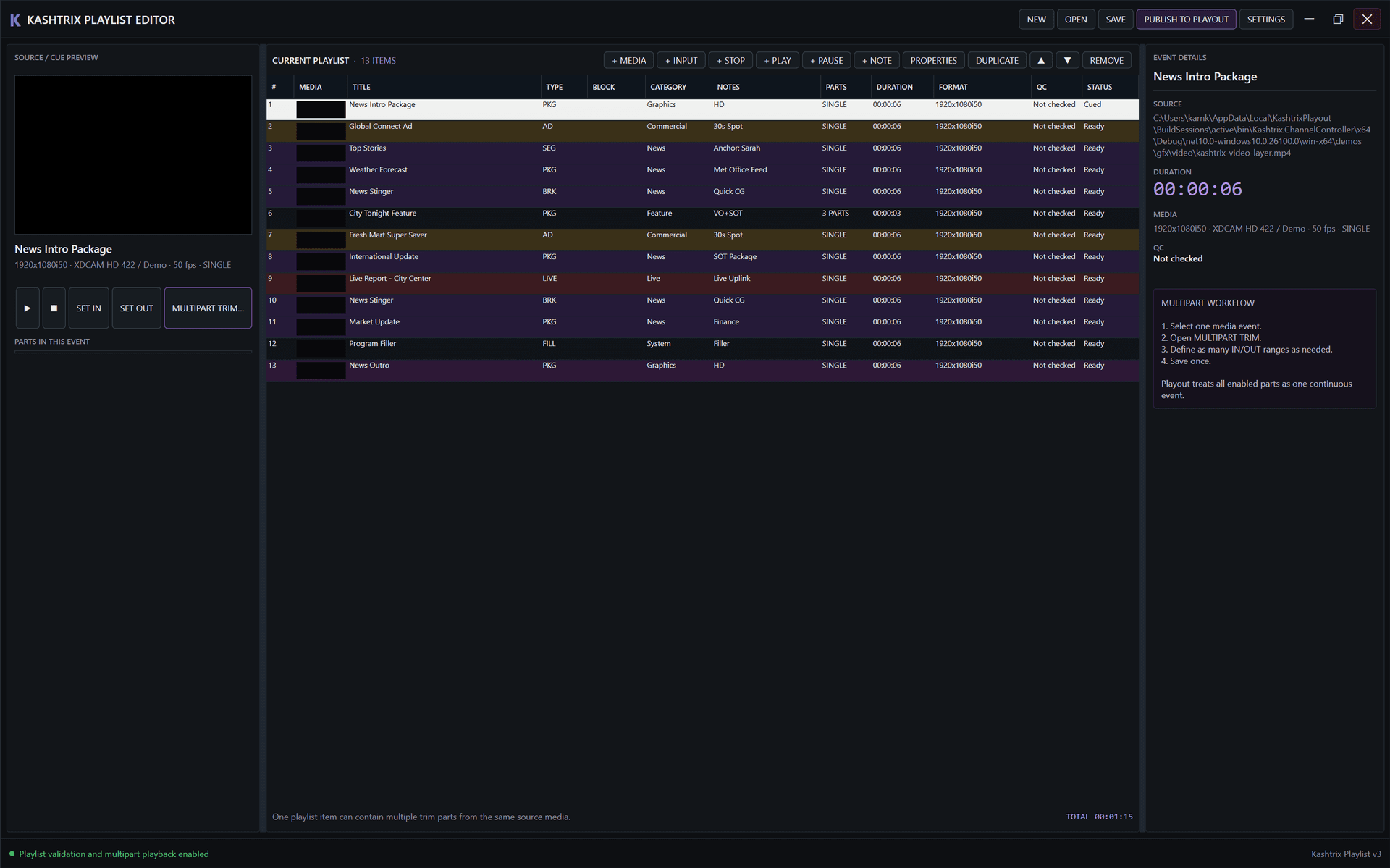
View 01 / 02 · 24/7 Linear Rundown

24/7 Frame-Accurate Linear Rundown Editor

Assemble broadcast transmission days with sub-frame precision.

Master broadcast rundown compilation environment. Assemble thousands of media events, commercials, live inputs, and secondary graphics triggers with frame-accurate timecode and live-safe editing.

Transition trigger modes:Frame-accurate auto-follow, hard-start, and manual-cue event triggers
Visual status flags:High-contrast color flags for Aired, Playing, Cued, Ready, and Missing media
Live-safe rundown editing:Insert, reorder, or delete upcoming items without interrupting playback
Commercial pod segmentation:Clear timing boundaries and calculated overrun/underrun indicators
Broadcast Rundown & Playlist Management - 24/7 Frame-Accurate Linear Rundown Editor
Interactive Workspace
Workstation Preview · View 01Native Workstation Display · Rundown
View 02 / 02 · Event & Multipart Workflow

Secondary Events & Multipart Clip Management

Configure trim points, multipart segments, and rundown metadata.

Detailed rundown event inspection console. Define multiple in/out ranges per media asset, attach graphics lower thirds, set commercial tags, and publish updates directly to active playout servers.
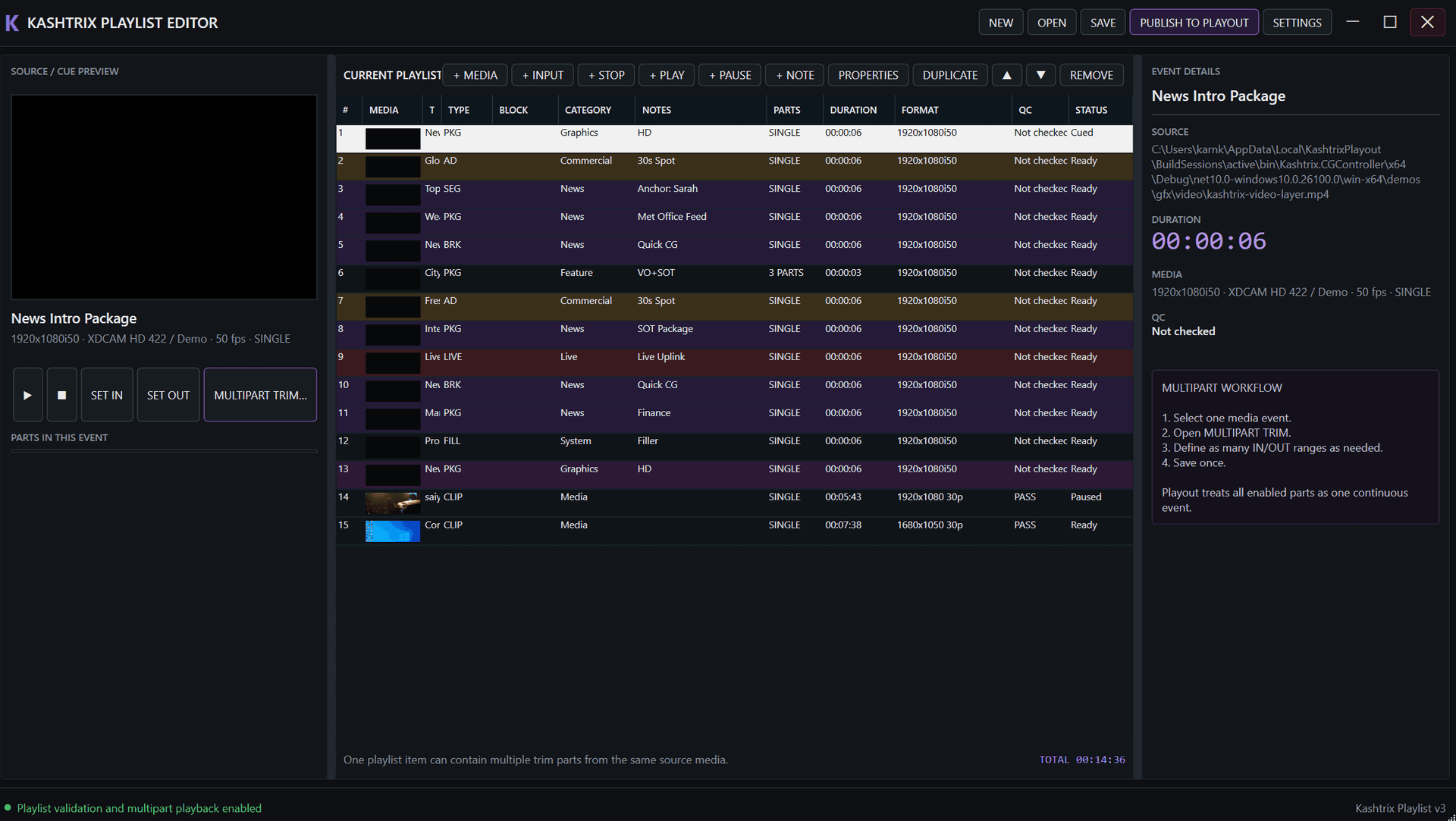
Multipart segmentation workflow:Define multiple in/out ranges treated as continuous playout events
Timecode duration validation:Real-time duration summation and clip timecode integrity checks
Instant playout publishing:One-click 'Publish to Playout' synchronization across master control engines
Secondary graphics binding:Attach automated station lower thirds and bugs directly to playlist events
Broadcast Rundown & Playlist Management - Secondary Events & Multipart Clip Management
Interactive Workspace
Workstation Preview · View 02Native Workstation Display · Rundown

Capabilities

Built around the rundown workflow.

The page uses the interface and operating model of this application only. Screenshots from unrelated Kashtrix products are not reused here.

01

Rundown Construction & Timing

Frame-accurate entry of media clips, live satellite feeds, graphics triggers, and ad blocks.
Auto-calculates start time, duration, and projected end times for every event across the 24-hour broadcast day.
02

Dynamic Live Modifications

Non-disruptive live editing:Insert, reorder, delete, or modify clips while the rundown is actively playing out on air.
03

Execution Modes

Auto-Follow:Consecutive clips trigger automatically upon previous clip completion.
Manual Hold / Cue:Pauses playback at the end of a clip awaiting operator trigger (ideal for news and live talk shows).
Time-Locked Events:Hard start times bound to national clock time (e.g., National News at exactly 20:00:00:00).
04

Secondary Events Attachment

Attach graphic template overlays and SCTE-35 ad cue triggers directly to specific rundown clips.

Role

Rundown

Workspace

Broadcast Rundown & Playlist Management

Platform

Windows x64

Operation

24/7 broadcast

Next application

Long-Term Programming & Commercial Traffic

Long-range planning, weekly/monthly calendar grid scheduling, commercial contract placement, and broadcast compliance logging.

Explore Scheduling

Rundown deployment

Evaluate Broadcast Rundown & Playlist Management for your facility.

Share your channel count, video standards, hardware interfaces, storage paths and automation requirements. We’ll map configuration and integration options around the actual broadcast workflow.